


Bingo Abradoodle: Mobile Bingo
4.742.39K Reviews
App Specs
- Version
- 4700
- Updated On
- License
- Free
- Downloads
- 10,000,000+
- Developer
- Abradoodle Games - fun bingo games
- Categories
- Casual
- Platform
- Android
Screenshots

 Analysis by AppCompare
Ever wanted to mix a classic game with some modern flair on your phone? Well, Bingo Abradoodle might just be your next obsession. I've been playing around with this app for the past few days, and let me tell you, it’s been quite the adventure!
What to expect when you start
For a casual game, bingo has an easy rhythm to pick up: listen for a call, check your card, and decide whether to mark the matching spot. That makes this a natural choice when I want something familiar rather than a game that asks me to learn a long set of rules. The appeal is less about mastering a complicated system and more about staying alert while the calls arrive.
I’d reach for it during a quiet wait, a short break, or a relaxed evening when I want a game I can follow without giving it my full attention every second. It suits people who already enjoy bingo and players looking for a gentle introduction to mobile casual games. If you prefer fast action, deep strategy, or a story that keeps unfolding, this is probably not the right fit; a puzzle or action game would give you more to work through.
There is also a practical difference between mobile bingo and a paper card at a community hall. A phone makes it easy to play wherever you have a moment, while an in-person game offers the atmosphere of a shared room and the pleasure of marking a physical card. I see this as a convenient alternative for solo downtime, not a full replacement for the social ritual of playing together in person.
Getting Started with Bingo Abradoodle
First things first, downloading Bingo Abradoodle is a breeze. Available for both Android and iOS, you can easily find it in your app store. Once you install and launch it, you're greeted with a vibrant and friendly interface. The colors pop, and it’s clear that the creators wanted to make this an engaging experience.
The app walks you through a quick tutorial, which is super handy if you’re new to mobile bingo games. It doesn't take long before you're diving into your first game. The navigation is straightforward, which is something I really appreciated.
For a first session, I’d keep the volume at a level where the caller is easy to hear and give myself a moment to learn the screen layout before trying to play while distracted. That small pause makes the basic loop less fussy: you can pay attention to the call instead of hunting for controls. If you tend to play in noisy places, headphones may make it easier to follow the audio, though I’d still keep the screen visible so I can check the card.
Worth Reading Before You Choose

EA SPORTS FC Mobile 26 Is a Bigger Football Game, but It Takes Time

Flipboard Shows What News Apps Must Do Beyond the Feed

Switching to Android Auto Means Rethinking Your Driving Routine

Google Calendar Makes a Crowded Week Easier to Manage

Ludo King Makes the Most of the Minutes Between Plans

Baby Panda World Brings Quick Play to Modern Phones, but Its Game Library Feels Busy
Gameplay and Features
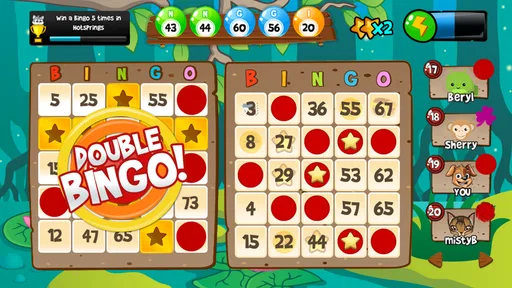
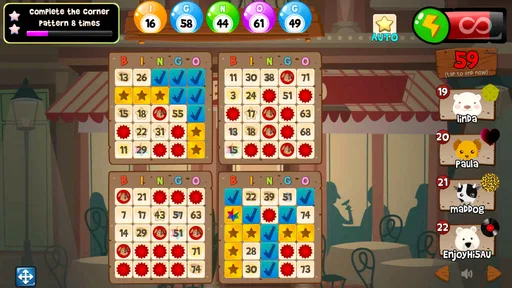
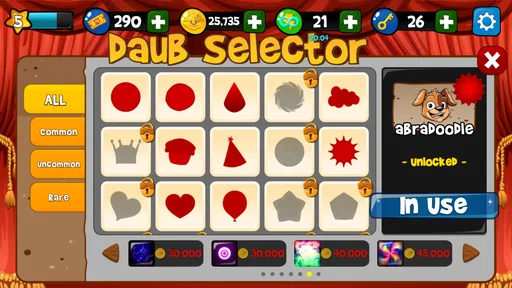
Now, onto the good stuff—the gameplay! Bingo Abradoodle offers a variety of levels and themes to keep things interesting. Whether you’re playing in Paris or chilling in the jungle, each game brings its own unique vibe. The developers have clearly put a lot of effort into the graphics and sound effects. It’s like you’re right there in a bingo hall, minus the commute!
The app also includes power-ups and boosts to make your bingo experience even more exciting. Things like "Double Daub" and "Extra Coins" can really spice up the game. Plus, the rewards system keeps you motivated to keep playing and leveling up.
My practical tip is to treat boosts as a choice rather than something to activate automatically. A bonus is most useful when it helps with the part of a round you find demanding; using every option just because it is available can make it harder to tell whether you enjoy the basic bingo itself. I’d also pause between rounds if I’m playing casually, rather than letting rewards turn a short break into a much longer session than I intended.
The themed settings are a welcome change of scenery, but they don’t alter what makes bingo appealing: watching the calls and checking the card. That consistency is useful if you want a familiar activity with a little visual variety. It may feel repetitive to someone who expects each setting to introduce a substantially different kind of play, so I’d choose it for the bingo loop, not for constant mechanical surprises.
Playing around other people
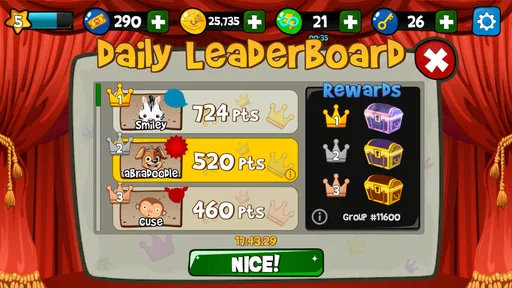
If you’re anything like me, playing games is more fun with friends. Bingo Abradoodle nails this aspect by allowing you to connect with friends and family. You can invite them to play or join existing games, which adds a whole new level of fun. There’s also a global leaderboard if you’re feeling competitive. Climbing the ranks gives you some serious bragging rights!
The chat feature is another cool addition. You can send messages and emojis to your fellow bingo lovers. It’s a great way to make new friends from all over the world. The community spirit in the app is genuinely heartwarming.
If you plan to play with someone you know, it helps to agree on a time first rather than assuming they’ll be online when you open the game. That turns the social side into a shared activity instead of a feature you have to explore alone. On the other hand, if you prefer quiet solo play, you can focus on the cards and treat chat and leaderboard competition as optional extras; they need not be the reason you install it.
Spending and session choices
Okay, let’s talk about the not-so-fun part—ads and in-app purchases. While the game is free to play, there are a bunch of optional purchases that can enhance your experience. You can buy coins or power-ups, but I found that you can still enjoy the game without spending a dime. The ads are there, but they’re not too intrusive. A quick ad here and there is a small price to pay for such a fun game.
The game is free to download, with optional in-app purchases priced from $0.99 to $99.99 per item. I’d decide on a personal spending limit before playing, especially if I’m tempted to buy a boost after a frustrating round. Treating purchases as optional extras rather than part of the entry fee helps keep a casual game casual. Anyone who dislikes ads or any purchase prompts should be cautious: even a manageable interruption can spoil the relaxed pace if you want an entirely uninterrupted experience.
A useful way to judge whether the game fits your routine is to try a short session first and notice what you actually enjoy: calling and marking, the themed presentation, or playing alongside other people. If the core round is what keeps you interested, there is less reason to spend just to extend the session. If your main reason is competition or collecting rewards, be more deliberate about how much time and money you want those loops to take.
Speed, stability, and everyday play
For this kind of casual bingo, I’d expect the important performance test to be whether the game feels responsive enough to follow calls and mark a card without turning a simple round into a chore. My impression is that its straightforward navigation and familiar gameplay make it easy to settle into. I wouldn’t judge it by the standards of a demanding action game; the useful question is whether it remains comfortable during the length of session you want.
Heavier moments are likely to be the ones when several things compete for attention: following the caller, checking the card, considering a boost, and noticing social activity. I find that putting the phone somewhere stable and focusing on one round at a time is a better fit than trying to play while switching constantly between other tasks. That’s a usability tip, not a claim that the game needs unusually powerful hardware.
For reliability, I’d keep the game open while a round is in progress if I can. As with any mobile game, closing an app, losing connectivity, or switching devices at the wrong moment can interrupt the flow, so I would avoid starting a round when I know I need to leave immediately. I can’t promise that a session will always recover in a particular way after an interruption; the sensible approach is to finish a round before changing apps when possible.
It is a casual game from Abradoodle Games - fun bingo games, with a 4.7 average from around 196,000 ratings and over 10 million installs. It is rated for Everyone, and the current version is 4675; the minimum Android requirement is version 6.0. Those details make it approachable for a broad audience, but older or busy phones can still feel different depending on what else is running. I’d close apps I don’t need if my device is already struggling, and keep enough battery for a session if I’m away from a charger.
Why I’d choose it—and when I wouldn’t
I’d choose this game when I want familiar bingo with enough presentation and social energy to make a phone session feel more lively than marking a bare digital card. I’d pass if my priority were uninterrupted play, a deeper strategic challenge, or the atmosphere of an in-person game. The useful test is whether its extra layers make the basic bingo round more enjoyable for me, rather than simply encouraging a longer session.
Who gets the most from this bingo game
I’d recommend it to someone who wants an easy-to-understand activity with a bit more color and social energy than a plain digital bingo card. It can suit a short solo break, a low-key evening, or a planned game with family and friends. The familiar rules lower the barrier to starting, while themes, boosts, and community features give regular players a few extra reasons to return.
It is less suited to people who want a game that rewards careful long-term planning or changes its core challenge often. A traditional number puzzle may be a better choice if you want to work through a problem at your own pace; a fast multiplayer game may be better if you want constant direct competition. And if you want the tactile, face-to-face warmth of a local bingo session, playing on a screen will not recreate that atmosphere, even with chat and friends available.
A realistic way to fit it into the day
Imagine I have a few minutes between errands and want to pass the time without committing to a long story or a complicated match. I can open a round, listen for the calls, and decide afterward whether I have time for another. If I’m meeting a friend later, I might instead set aside a longer, more focused session so we can enjoy the social side rather than squeezing it into a distracted moment.
That distinction matters because bingo still asks for attention. It may look like a game to play entirely in the background, but missing calls can make a round less satisfying. I’d avoid starting while crossing a busy street, driving, or handling a task that needs my eyes and ears. It works best when “casual” means low pressure, not no attention at all.
How it compares with other casual choices
Compared with a bare-bones bingo app, the themes and social features give this one a more lively feel. Compared with broad casual-game collections, it has a clearer identity: bingo is the main reason to open it, rather than one activity among many. That focus is a strength if you already like bingo, but it also means it won’t provide the same variety as switching between different puzzle or arcade games.
The trade-off is between convenience and control. A simple offline card game can be quieter and more self-contained, while this experience adds presentation, progression, and ways to interact with other players. If you want a quick digital version of bingo with extra layers around it, those additions may be appealing. If you want no interruptions, minimal social contact, or a very stripped-down interface, a simpler alternative is likely to suit you better.
My final take
Overall, Bingo Abradoodle is a charming and captivating app that brings the classic game of bingo right to your fingertips. It’s perfect for those moments when you need a quick break or want to unwind after a long day. The vibrant graphics, engaging gameplay, and social features make it stand out in the crowded app market.
So, if you’re on the hunt for a new game to try out, give Bingo Abradoodle a shot. You might just find yourself saying "Bingo!" more often than you think.
Pros
- Engaging graphics and animations.
- Variety of bingo rooms available.
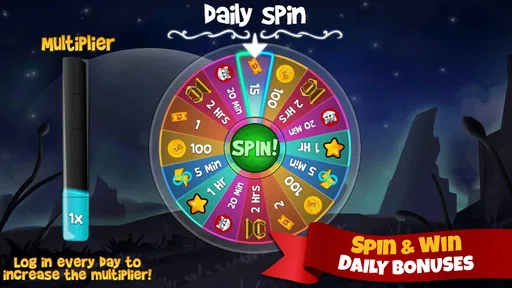
- Daily bonuses keep players returning.
- Simple and intuitive user interface.
- Social features enhance interaction.
Cons
- Requires constant internet connection.
- In-app purchases can be costly.
- Ads can disrupt gameplay.
- Limited offline features.
- Occasional connectivity issues.
FAQs for Bingo Abradoodle: Mobile Bingo
What is Bingo Abradoodle and how does it differ from other bingo games?
Bingo Abradoodle is a mobile bingo game that combines classic bingo gameplay with unique and engaging features, such as themed rooms, power-ups, and social interactions. Unlike traditional bingo apps, Bingo Abradoodle offers a vibrant and playful design, making it more appealing to a wide range of players, from beginners to seasoned bingo enthusiasts.
Is Bingo Abradoodle free to play, and are there in-app purchases?
Yes, Bingo Abradoodle is free to download and play. However, it does offer in-app purchases that allow players to buy additional coins, power-ups, and other items to enhance their gaming experience. While these purchases can provide advantages, they are optional, and players can enjoy the game without spending money.
What are the minimum system requirements for Bingo Abradoodle on Android and iOS?
To run Bingo Abradoodle smoothly, Android users need at least Android version 5.0 (Lollipop) or higher, while iOS users require iOS 10.0 or later. It's also recommended to have a stable internet connection to ensure seamless gameplay and access to all features, including social interactions and multiplayer modes.
Can I play Bingo Abradoodle with friends, and how does multiplayer work?
Yes, Bingo Abradoodle allows players to connect with friends and compete in multiplayer bingo games. You can invite friends directly from the app or connect your social media accounts to find and play with friends. Multiplayer mode enhances the fun by adding a competitive edge and allowing players to chat and interact during games.
How does Bingo Abradoodle ensure fair play and prevent cheating?
Bingo Abradoodle employs rigorous security measures to ensure fair play, including random number generation for bingo calls and regular monitoring of game activities. The app also includes reporting features, allowing players to report suspicious behavior. These measures help maintain a fair and enjoyable gaming environment for all users.


